
Skip to content
  • Forex CRM & Client Area for Brokers
  • Forex IB & Partners Management
  • NP MetaSuite: MT4 & MT5 Tools & Plugins
  • MT4 & MT5 Services: Administration & Development
  • Solutions
    • BROKERAGE OPERATIONS
      CRM
      Forex CRM & Client Area
      Manage clients, onboarding, KYC, payments and sales.
      IB
      IB & Partners Management
      Build and automate multi-level partner networks.
      METATRADER
      MT
      MT4 & MT5 Services
      Hosting, administration, development and support.
      MS
      NP MetaSuite
      Purpose-built MT4 & MT5 tools and plugins.
      RISK MANAGEMENT
      EARLY ACCESS
      BrokerCNC
      AI-powered brokerage intelligence for risk, profitability, execution and trader behaviour.
      Discover BrokerCNC →
  • Integrations
  • Careers
  • News
  • Contact

See Nullpoint in Action

Tell us a little about your brokerage and what you’re looking for. Our team will arrange a tailored demo focused on the solutions most relevant to your operation.

Please enable JavaScript in your browser to complete this form.
Loading
MT4 & MT5 Plugins

Automate MT4 & MT5 Symbol Trade Modes
September 14, 2026 Nullpoint Technologies Comments Off on Automate MT4 & MT5 Symbol Trade Modes
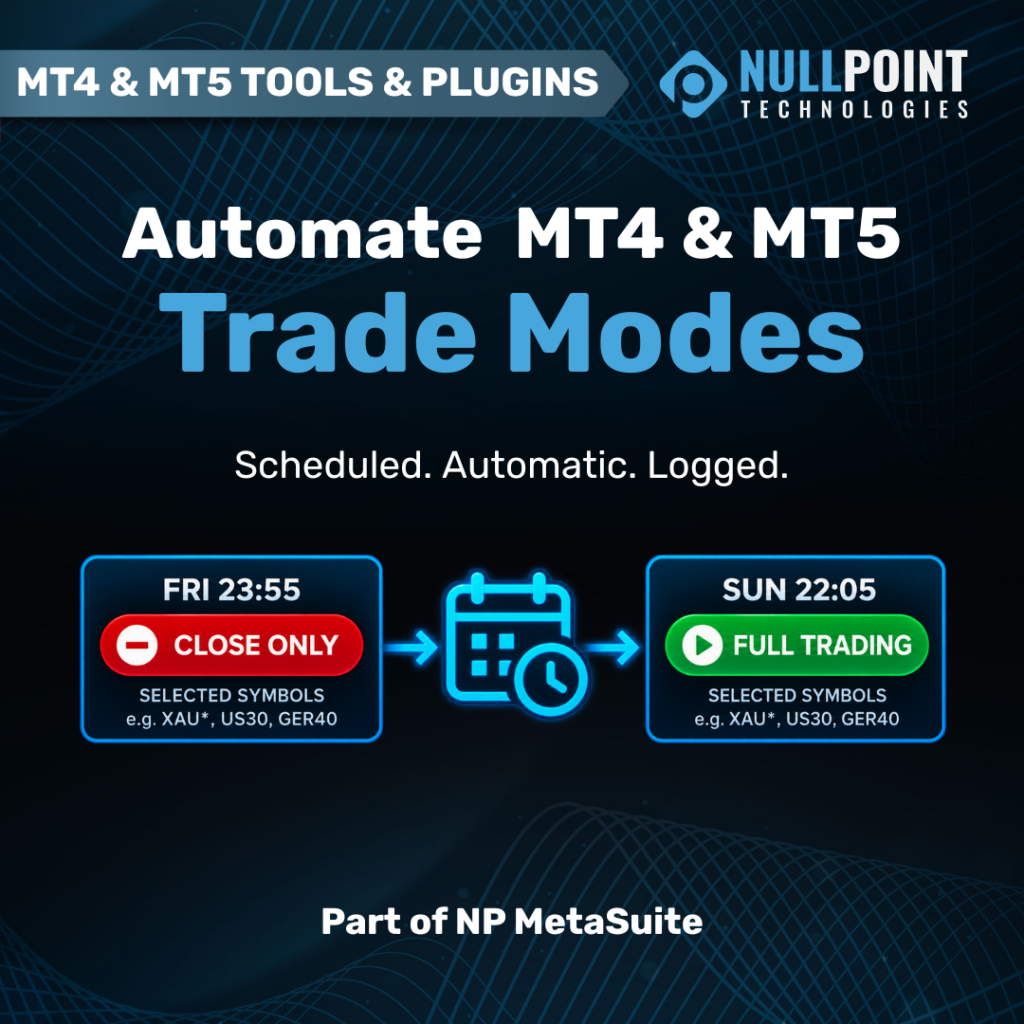
Nullpoint MetaSuite Symbol Trade Mode Scheduler automating scheduled trading-mode changes across MT4 and MT5.

Automate MT4 & MT5 Symbol Trading Modes with Nullpoint MetaSuite

Managing symbol trading conditions is a routine part of brokerage operations, but many of the controls surrounding weekends, market openings and temporary trading restrictions still require manual intervention from dealing or platform administration teams.

A dealer may need to place a group of instruments into Close Only before the weekend and then return those same instruments to Full Trading when markets reopen. When this process has to be repeated across multiple symbols and trading servers every week, a simple operational task becomes another procedure that must be remembered, executed correctly and verified.

Nullpoint has developed a new MetaSuite tool to automate that process.

Introducing the Symbol Trade Mode Scheduler for MT4 & MT5

The Nullpoint Symbol Trade Mode Scheduler allows Forex and CFD brokerages to schedule changes to symbol trading modes across MetaTrader 4 and MetaTrader 5.

Depending on the required operational rule, a symbol can automatically be switched to:

  • Disabled
  • Long Only
  • Short Only
  • Close Only
  • Full Trading

Actions can be scheduled for a specific date and time or configured as recurring operations.

For example, a brokerage could create a weekly sequence that places selected instruments into Close Only every Friday at 23:55 and automatically restores Full Trading every Sunday at 22:05.

Once configured, the procedure runs automatically.

Built for Recurring Brokerage Operations

The primary objective is straightforward: remove repetitive manual trading-platform administration from processes that can be predefined.

Rather than requiring a dealer or administrator to remember the same symbol changes every week, the brokerage can define the required schedule once and allow the system to execute it consistently.

This can be particularly useful for weekend procedures, instrument trading hours, operational restrictions and other recurring controls where the required trading mode is known in advance.

Control Individual Symbols or Entire Groups

Brokerages rarely manage only a handful of instruments.

The Symbol Trade Mode Scheduler can therefore apply rules to individual symbols or use wildcard patterns to target groups of instruments at once.

This makes it possible to create broader operational rules without manually configuring every instrument separately.

Execution Visibility

Automation is only useful when the operations team can verify what happened.

Every scheduled execution is logged with its results, providing administrators with a record of the action performed. Optional Slack notifications can also provide confirmation after a scheduled job has executed.

This gives dealing and administration teams greater visibility while reducing the amount of routine work they need to perform manually.

Available for MT4 and MT5

Nullpoint is releasing dedicated versions for both MetaTrader platforms:

MT4 Symbol Trade Mode Scheduler
Automated symbol trade-mode scheduling for MetaTrader 4 environments.

MT5 Symbol Trade Mode Scheduler
Automated symbol trade-mode scheduling for MetaTrader 5 environments.

Both are part of NP MetaSuite, Nullpoint’s collection of purpose-built MT4 and MT5 tools and plugins for Forex and CFD brokerages.

Automate More of Your MetaTrader Operations

The Symbol Trade Mode Scheduler follows the same philosophy behind MetaSuite: repetitive platform-management processes should not require unnecessary manual work when they can be controlled through predictable rules.

From trading restrictions and risk controls to fees, leverage, execution rules and APIs, MetaSuite is designed to give brokerages greater control over the operational layer surrounding MT4 and MT5.


Explore NP MetaSuite →

  • Broker Risk Management
  • Brokerage Automation
  • Forex Broker Tools
  • Forex Brokerage Technology
  • MetaTrader 4
  • MetaTrader 5
  • MetaTrader Tools
  • MT4
  • MT4 Plugins
  • MT4 Tools
  • MT5
  • MT5 Plugins
  • MT5 Tools
  • NP MetaSuite
  • risk management
  • Symbol Trade Mode
  • Trade Mode Scheduler
  • Trading Automation
  • Trading Platform Automation
Nullpoint Technologies

Post navigation

Previous

Search

Categories

  • Announcements (1)
  • Events (6)
  • Forex CRM (1)
  • Integrations (4)
  • MT4 & MT5 Plugins (1)
  • Product News (22)

Recent posts

  • Nullpoint MetaSuite Symbol Trade Mode Scheduler automating scheduled trading-mode changes across MT4 and MT5.
    Automate MT4 & MT5 Symbol Trade Modes
  • MT5 CRM guide for Forex brokers with client management, KYC, payments and IB management
    MT5 CRM: The Complete Guide for Forex Brokers
  • Forex IB Management System for multi-level partner networks, commissions and rebates
    Forex IB System: How Brokers Automate Partners, Rebates and Commissions

Tags

Bonus Automation Brokerage Automation Brokerage CRM Brokerage Software Brokerage Technology Client Area Client Retention CRM Automation CRM for Forex Brokers cTrader CRM Fintech Forex Back Office Forex brokerage Forex Brokerage Technology Forex Broker CRM Forex Broker Software Forex Client Area forex CRM Forex CRM Client Area Forex CRM Platform Forex CRM Software Forex IB Management Forex IB Management System Forex IB System forex software Forex technology IB Commission Tracking IB Management IB management system Introducing Broker Introducing Brokers KYC MetaTrader 4 MetaTrader 5 MetaTrader CRM MT4 MT4 and MT5 administration MT4 CRM MT4 CRM Integration MT5 CRM MT5 CRM Integration Multi Level IB Nullpoint Technologies Payment Gateway Integration Trader's Room

Related posts

MT5 CRM guide for Forex brokers with client management, KYC, payments and IB management
Forex CRM

MT5 CRM: The Complete Guide for Forex Brokers

September 9, 2026 Nullpoint Technologies Comments Off on MT5 CRM: The Complete Guide for Forex Brokers

Discover how an MT5 CRM connects MetaTrader 5 with client management, onboarding, KYC, payments, IB operations and reporting, and what brokers should evaluate when choosing a provider.

Forex IB Management System for multi-level partner networks, commissions and rebates
Product News

Forex IB System: How Brokers Automate Partners, Rebates and Commissions

September 5, 2026 Nullpoint Technologies Comments Off on Forex IB System: How Brokers Automate Partners, Rebates and Commissions

Learn how multi-level Forex IB systems automate partner hierarchies, rebates, commissions, cashback and payouts across growing Forex and CFD partner networks.

Illustration of an enterprise MT5 CRM dashboard featuring client management, automation, IB management, reporting, and MetaTrader 5 integration for Forex brokerages.
Product News

Best MT5 CRM: How to Choose the Right CRM for Your Brokerage (2026 Guide)

August 26, 2026 Nullpoint Technologies Comments Off on Best MT5 CRM: How to Choose the Right CRM for Your Brokerage (2026 Guide)

Choosing the right MT5 CRM is one of the most important technology decisions for any Forex brokerage. Discover the essential features, integrations, automation capabilities, and best practices every broker should evaluate before selecting a CRM.

Reg. No: HE 364070 | VAT No: CY10364070N

Solutions for Forex Brokerages
  • Forex CRM & Client Area Platform
  • IB & Partners Management System
  • MetaTrader 4 & 5 Hosting and Administration
  • MetaTrader 4 & 5 Broker Tools and Plugins
Company
  • Careers
  • Contact

Disclaimer: 
MetaTrader 4™ and MetaTrader 5™ are trademarks of MetaQuotes Software Corp. and cTrader™ is a trademark of Spotware Systems. Their use does not imply any affiliation with or endorsement by the respective trademark holders.

Copyright © 2026 Nullpoint Technologies. All rights reserved.

  • Cookie Policy
  • Data Privacy
Your Privacy Matters

We use cookies to ensure our website works properly, understand how it is used and improve your experience. You can accept all cookies, deny optional cookies or manage your preferences at any time.

Functional Always active
Required for the website to function properly. These cookies cannot be disabled.
Preferences
The technical storage or access is necessary for the legitimate purpose of storing preferences that are not requested by the subscriber or user.
Statistics
Helps us understand how visitors use our website so we can improve its performance and content. The technical storage or access that is used exclusively for anonymous statistical purposes. Without a subpoena, voluntary compliance on the part of your Internet Service Provider, or additional records from a third party, information stored or retrieved for this purpose alone cannot usually be used to identify you.
Marketing
Used to measure marketing effectiveness and deliver relevant content across websites and platforms.
  • Manage options
  • Manage services
  • Manage {vendor_count} vendors
  • Read more about these purposes
Preferences
  • {title}
  • {title}
  • {title}